Apple wants your phone to help you think. Here is everything they annouced
Apple has officially joined the AI race, took a while but better late than never. AI dominated the WWDC event, but unlike Google’s event, Apple also spent a lot of time on the basics like performance, design, and making the things people already use work better. That balance is probably the most Apple thing about the whole event.

What do Siri and Google Assistant have in common? They never work when you need them, and now they’re both powered by Gemini. Apple has officially joined the AI race, took a while but better late than never. AI dominated the WWDC event, but unlike Google’s event, Apple also spent a lot of time on the basics like performance, design, and making the things people already use work better. That balance is probably the most Apple thing about the whole event. Let’s talk about what was annouced.
The last WWDC with Tim Cook in charge.
You Can Now Adjust Liquid Glass
One of the biggest complaints about Liquid Glass when iOS 26 launched was that the design language felt too distracting and not readable enough in some places. Apple listened and liquid Glass is now adjustable through a new slider in settings, letting you pick anything from ultra clear to fully tinted. This customisations will be available even in third-party apps that have already adopted the liquid glass design.
Press enter or click to view image in full size
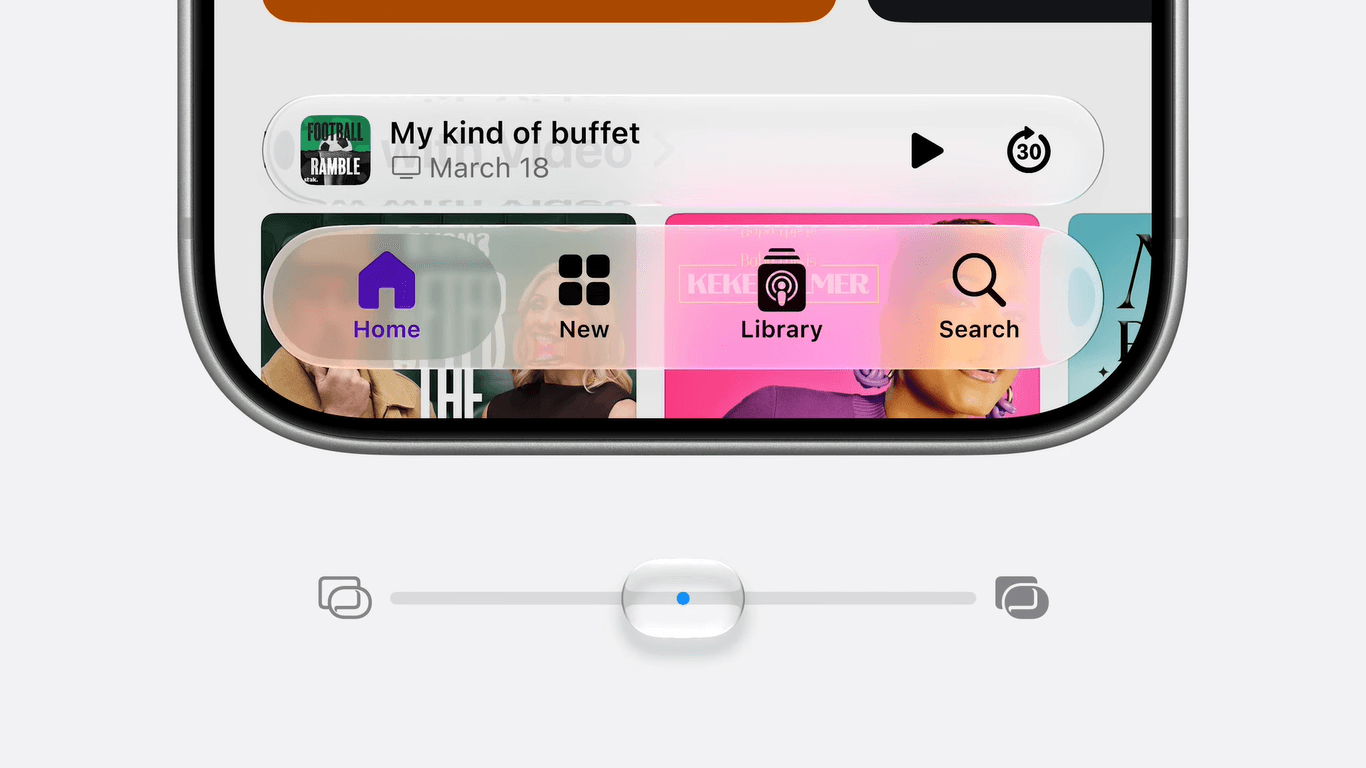
New slider for adjusting liquid glass from ultra clear to fully tinted
Performance Got a Big Boost
Apple spent a lot of time on speed and responsiveness, and the numbers are actually impressive. They claim iPhone and iPad apps will launch up to 30% faster, photos will load up to 70% faster in your library, and AirDrop transfers should be up to 80% faster. Browsing files and transferring them from iPad to an external drive is also supposed to be faster. Another smaller but useful improvement worth mentioning is that iOS will now be smarter about when to stay on Wi-Fi and when to switch to mobile network.
Thy also mentioned improvement to the CPU scheduler, which is going to come to older iPhones all the way back to the iPhone 11. This means older models will actually feel more responsive after the update. Personally I think it is pretty cool that iphones from about 6–7 years ago are gonna get these updates as well.(I promise that was not a refrence to Ronaldo's take on the worldcup or the 6-7 meme)

All iphones that will get the iOS 27 update
Search Can Now Find Things
This will be one of those changes you do not realise you needed until you have it. Apple rebuilt the foundation of search across iOS, iPadOS, and macOS(The new verion is named Golden Gate), which powers Spotlight, Photos, and Mail. The new search infrastructure is more stable, more efficient, and better at indexing both old and new content. Mail also gets a new ranking system that surfaces more relevant results, so the email you are looking for is more likely to be the first thing you see, even if it was sent months ago. If you have ever struggled to find something you knew was on your phone, this is going to feel like a meaningful upgrade.
A Big Parental Controls Overhaul
For parents this is the biggest update of the event. Apple is expanding their child safety features significantly. There is now a setup assistant for kids that lets parents pick exactly what apps and content their child can access from the start, with the option to add more as the child grows. Ask to Browse is a new feature that lets kids request access to websites in Safari, the same way Ask to Buy works for apps.

Time Allowances let parents set recommended daily limits across Entertainment, Games, and Social Media, based on the child’s age. They mentioned it is developed with the input of the American Academy of Pediatrics. Schedules also let parents block certain apps during school hours. Communication Safety, which already blurs nudity in shared images and videos, has also been expanded to step in before kids can see gore or violent content. The whole Screen Time interface has been redesigned to make it easier to see what kids are doing and adjust access quickly. It is comprehensive, and feels like Apple actually consulted experts instead of just throwing features at the problem.

Another thoughtful update is the connectivity update, Parents must approve new contacts before a child can connect with them, so you always know who your child is talking to on the Internet. In a world filled with creeps and Epstein islands, these are extra layers of safety to help parents keep their kids from danger. On a lighter note, I wish apple would design similar features for young adults to keep their aging parents in check too.

New contacts must be approved before a child can connect with them
Apple Intelligence’s New Architecture
Now let’s talk about the shiny thing everyone loves these days, AI. Apple’s next generation of Apple Intelligence is built on a new architecture, and what would have been the most surprising part is that it is built in deep collaboration with Google’s Gemini team, but we’ve known about this for a while.what we did not know was how apple would approach intergrating it, but during the event it was made clear that Apple’s new Foundation Models will leverage the technologies behind Gemini, and adapt it to run both on-device and on servers through Private Cloud Compute, so it technically should be more than a Gemini wrapper. This is still a massive shift for a company that has historically built almost everything in-house.

The new architecture enables personal context understanding, app actions, on-screen awareness, and image understanding across the entire system. Apple was also very clear about privacy, saying their data is not stored or accessible to Apple or anyone else, including Google.
Siri AI
This is the headline of the event. Apple is calling the new version of Siri “Siri AI”, and it is built around the new Apple Intelligence architecture. It is more conversational, has access to broad world knowledge, can understand the context of what is on your screen, and can pull information from across your apps. Some examples from the demo included asking Siri for directions to a location your friend texted you (without saving the address), finding specific photos from a recent trip and sharing them with a family album, and planning a watch party menu by pulling recipes and recommendations from across apps.

On supported devices, Siri AI also has a new expressive voice that sounds noticeably more natural than what we have today, and you can customise it’s expressivity and pace until it clicks for you. System-wide dictation also got a big accuracy boost, with much better handling of spelling, punctuation, and capitalisation, but I doubt it would be as good as google’s rambler.
Apple Intelligience
There is also a new dedicated Siri app where your conversations are saved and synced across your devices through iCloud, so you can start chatting with Siri on your iPhone and continue on your Mac. Siri AI is launching in beta later this year, English first, with more languages to follow. It will not be available in the EU at launch, and the same applies to China while Apple works through regulatory requirements. Something else to keep in mind is that the most powerful on device models would only be availabe on only the latest devices.
Visual Intelligence Got better
Visual Intelligence, the feature that lets you point your iPhone at something and get information about it, is now built directly into the Camera app with a dedicated Siri mode. Tap the shutter button to let Siri see what you see and get a useful response. You can point it at a plate of food to get nutritional info, or at a restaurant bill to split it with Apple Cash. It is also coming to macOS, iPad, and visionOS with platform-specific integrations.
Photos Got New Editing Tools
Apple is putting Apple Intelligence to good use in the Photos app with three new editing tools. Clean Up, which removes distractions from your photos, is getting a major quality upgrade with better and more realistic infill, even in complex scenes. Extend lets you give your subjects more breathing room or fix a crooked horizon without losing important parts of the photo. And then there is Spatial Reframing, which is genuinely impressive. It lets you change the framing of a photo after it has been taken, as if you had moved the camera at the moment you took the shot. It uses on-device spatial models combined with AI image generation to fill in the new parts of the scene naturally. The example Apple showed during the demo was changing the angle of a family photo to better centre the kids in the already taken photo, the result looked completely natural. It works on almost any photo in your library, including older ones and ones taken with other cameras.
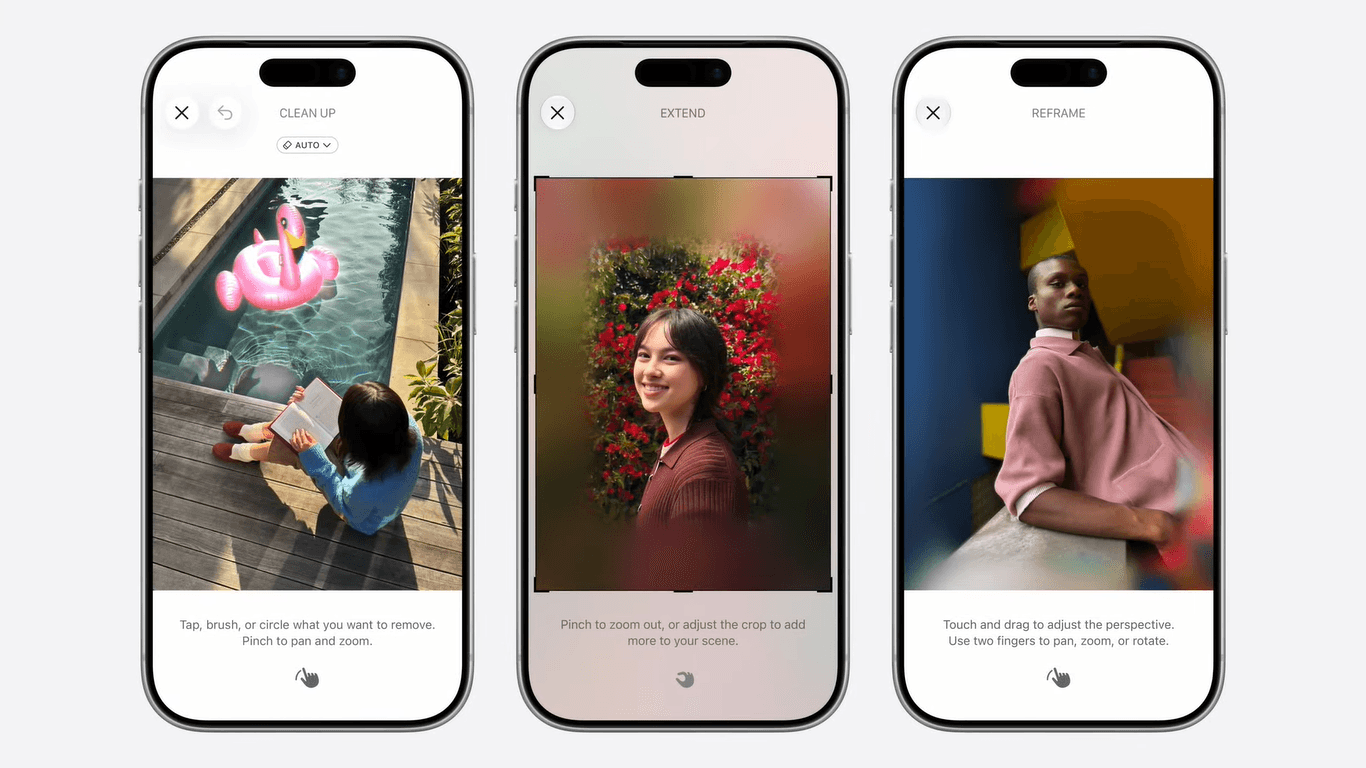
Clean Up, Clean Up, and Spatial Reframing
Smarter Apps Everywhere
Apple Intelligence is now built into a lot of the apps you use every day in really useful ways. Messages can now offer one-tap suggestions based on the context of your conversations, like creating a reminder if someone mentions a task. Mail can surface contextual actions when you receive an email, including the option to launch third-party apps. Calendar lets you add events just by describing them in natural language, even pulling contacts and locations automatically.
The Phone app got a nice small additions. When you call a business, Call Context proactively surfaces relevant info from your apps. So if you call an airline to change a flight, your confirmation code from Mail just shows up at the start of the call. It runs entirely on-device and looks at who you are calling, not what you are saying.
There is also a system-wide automatic proofreading feature now, which works across the system including in most third-party apps, it is supposed to work by just fixing things quietly as you type.
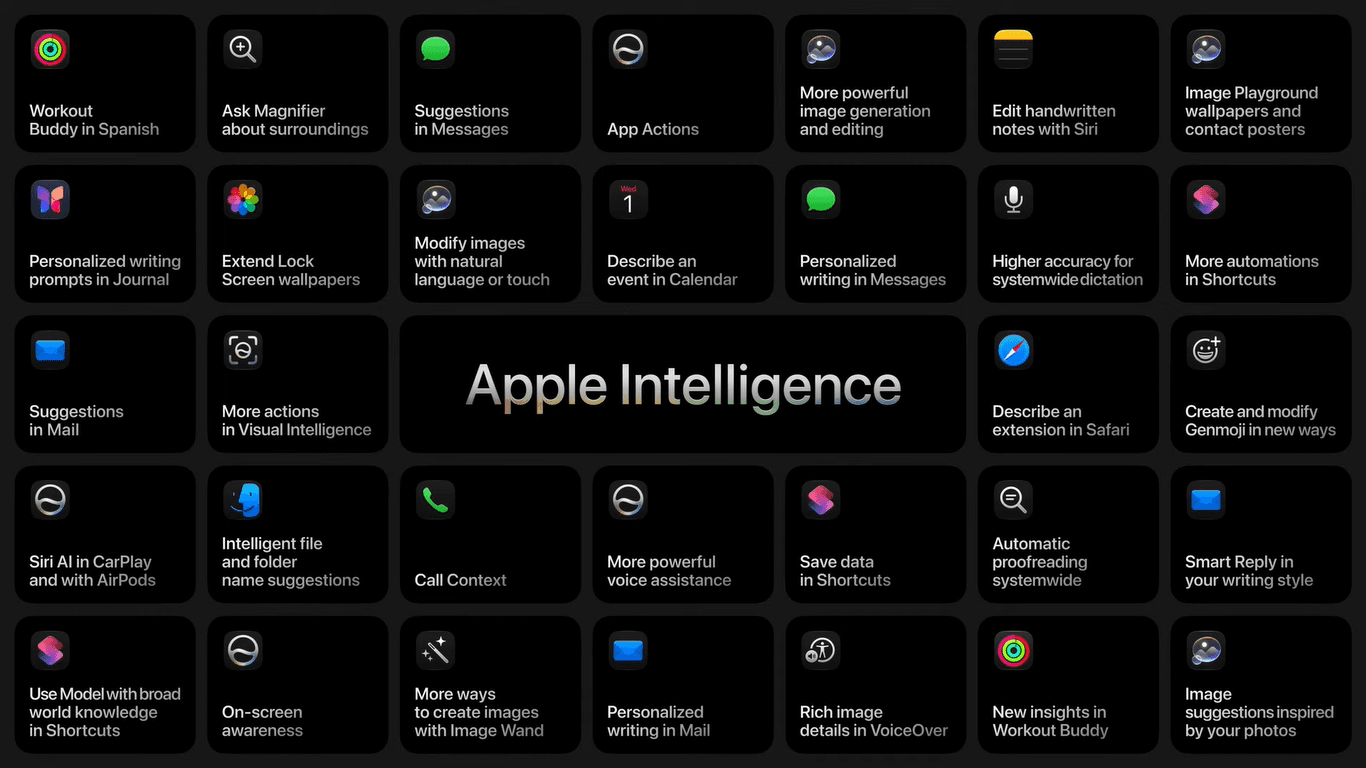
Features powered by Apple inteligience
Apple Home Got Smarter Too
The Home app is using Apple Intelligence to do useful things with your home cameras. It can now generate descriptions of what happened in recorded clips, so you can search through camera footage by what was captured instead of scrubbing through hours of video. The Home app can also connect related clips across multiple cameras to give you a full picture of what happened. Notifications from your home accessories are also smarter now, grouping related ones into a single notification that updates as the activity continues.
Long Story Short
There were a lot of other interesting things shown, including the Passwords app automatically updating weak passwords for you, Safari organising tabs by topic and monitoring web pages for changes, Image Playground getting a major upgrade with photorealistic generation, AirPods custom EQ, full-resolution Shared Albums that work with Android and Windows users, perimenopause and menopause support in the Health app, Improvemnets to shortcuts where you can now describe what you want in natural language and Shortcuts will assemble the steps for you, Vision Pro letting you turn panoramas into spatial environments, and Maps Flyover getting an AI boost for sharper detail.

Apple announced a lot of other interesting features
There is also a lot of developer-focused stuff including new frameworks for building intelligent apps, Xcode now supporting Gemini for agentic coding, and a unified Device Hub for testing. The betas are out for developers, with public betas coming next month and the full release later this year. Some of the more powerful AI features have daily usage limits because they rely on server-side models, but those limits can be increased with most iCloud+ subscription plans. It is one of the most consequential WWDCs in years, and the fact that Apple is openly working with Google on AI means there’s hope they will collaborate on more things in the futre to the benefit of people on both the iOS and android side.
One more thing, there was a part where they did a demo of developer tools that will allow you build iOS apps that can resize to diffrent aspect ratios, which if you have been following the rumour, they were pretty much teasing the folding iphone expected this year, and that is something else to look forward to this year. I’d like to hear what you think about these new updates, if you use an iphone, does anything excite you? and if you use an Android, is there anything here you will like to see come to Android? Let me know in the comments